XERION
The EURUSD trading bot that runs your charts while you live your life.
Plug it into MetaTrader 4, pick your risk level, and let it hunt day-trade setups on autopilot. No subscription. No hidden fees. Straight from the developer, 100% free.
Built for one pair.
Tuned to the max.
Xerion doesn’t try to trade everything. It focuses 100% on EURUSD — the most liquid pair on the planet — and reads the 15-minute chart for clean day-trade entries.
It scans for the trend first, skips the sketchy fake breakouts, and stays out when spreads get ugly. Setup is dead simple: just pick your lot size and the martingale multiplier to match your style.
3 modes. Same engine.
Chill and steady, or full send? Just change the lot size. Everything below is based on a $2,000 account.
- Balance$2,000
- Lot size0.01
- Best forBeginners
- Balance$2,000
- Lot size0.05
- Best forMost traders
- Balance$2,000
- Lot size0.10
- Best forHigh-risk takers
*Targets come from backtests and testing — not a promise. Higher modes = bigger swings and bigger drawdowns. Start small, then level up.
Smart filters. Your rules.
Smart filters are built in. You only touch two settings — no coding required.
Trend Detection
Xerion reads which way EURUSD is really moving before it does anything. No fighting the market — it trades with the flow.
Fakeout Filter
Those spikes that look like a breakout and then snap right back? Xerion is built to sit those out and wait for a cleaner move.
Spread Guard
Spreads too wide (news, rollover, low liquidity)? Xerion just doesn’t enter.
Lot & Multiplier
Only two settings: your fixed starting lot and the martingale multiplier. Dial the aggression up or down in seconds.
Full Auto, 24/5
Runs the whole trading week without you babysitting the chart. Pop it on a VPS, check in when you feel like it.
3 years of data. One clear trend.
EURUSD M15 backtest on MT4 Strategy Tester — Sep 2023 to Sep 2026. Safe mode (0.01 lot), $10,000 starting balance.
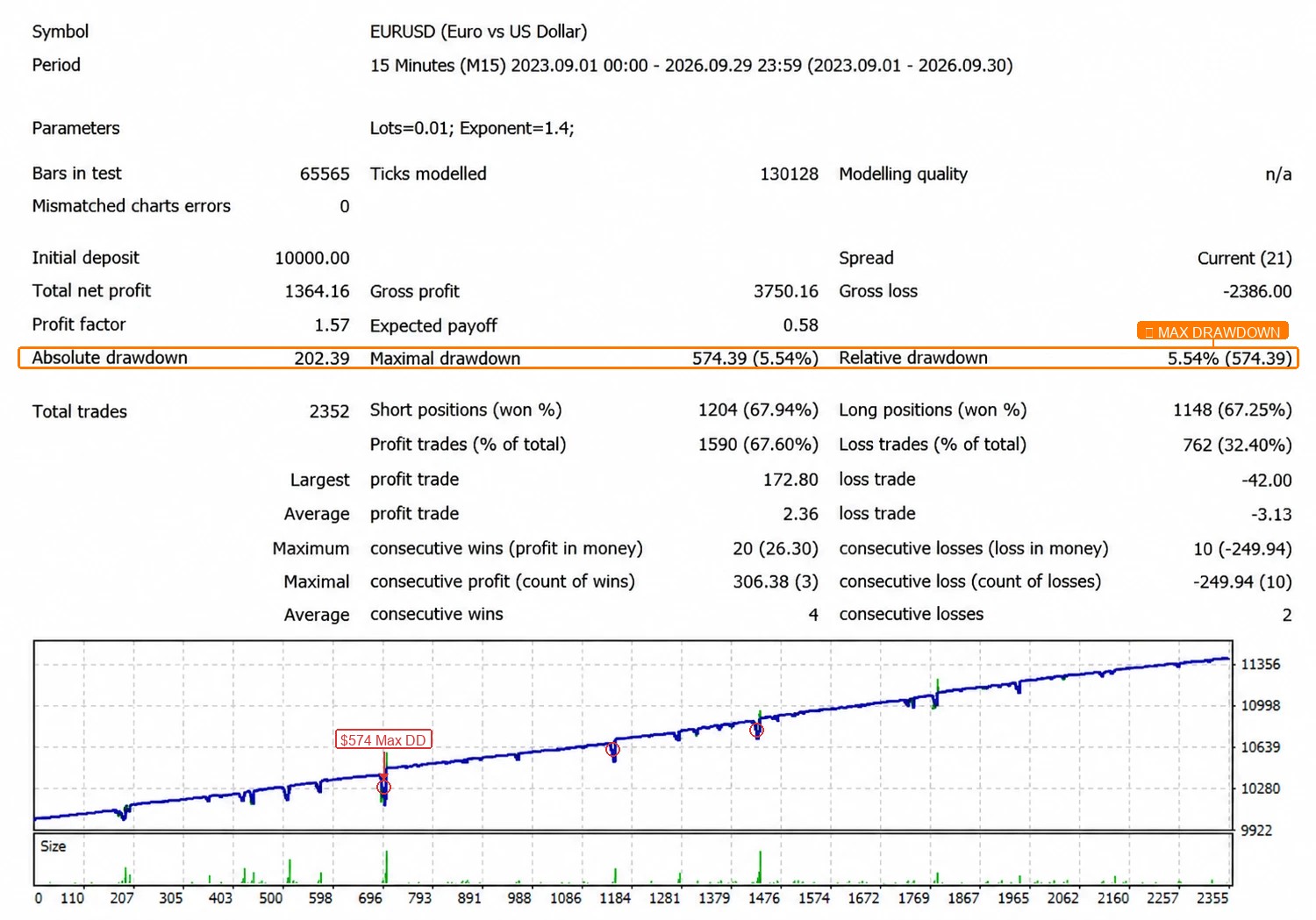
The backtest uses $10,000 / 0.01 lot, but you can start Safe mode with as little as $1,000 / 0.01 lot. Same settings, same logic — just a smaller account.
Scale up to Turbo mode (0.10 lot) for roughly 10× the profit — and 10× the drawdown. Match the lot to your balance and risk appetite.
Backtest ≠ live results. Spreads, slippage and market conditions will differ. Use the backtest as a reference, not a promise.
3 steps. About 10 minutes.
No payment, no credit card, no sign-up. Here’s the whole process.
Open an XM or HFM account (MT4)
Sign up with either broker using our link and partner code, and choose an MT4 account. No partner code = we can’t approve your account, so don’t skip it.
Submit your MT4 account number
Just your account number — nothing else. We check it’s linked to our partner code, then approve it. Usually within 24 hours.
Download Xerion & go live
Download the EA and load it on MT4 · EURUSD · M15, with “Allow DLL imports” ticked. Keep AutoTrading off for now — the chart shows “Waiting for approval” and checks every 5 minutes. When it says “Approved”, turn AutoTrading on. Browser warns about the file? Just choose “Keep”. Still not approved after 24 hours? Message us on Telegram with your account number.
Heads up: Xerion is locked to your approved account number, so it only runs on that account. Questions? Ask us on Telegram.
Up and running in 5 minutes.
Everything you need after downloading. No coding — just two settings.
Put Xerion into MT4
- In MT4, click File → Open Data Folder
- Open MQL4 → Experts and paste Xerion.ex4 there
- Restart MT4 (or right-click Expert Advisors in the Navigator → Refresh)
- Open a EURUSD chart and switch it to M15
- Drag Xerion from the Navigator onto the chart
Seeing “Time NG” on the chart? It’s not on M15 — switch the timeframe.
Tick “Allow DLL imports”
When the settings window pops up, open the Common tab and tick both boxes. DLL is needed to check your approval — without it, Xerion can’t start.
Wait for “Approved”
Keep AutoTrading OFF for now. Xerion checks your approval every 5 minutes and shows its status at the top-left of the chart:
Once it says Approved, click the AutoTrading button at the top of MT4 so it turns green. Done!
Pick your mode
Only two inputs, in the Inputs tab:
| Mode | Lot size | Multiplier | Monthly target* |
|---|---|---|---|
| Safe | 0.01 | 1.4 | 2–5% |
| Balanced | 0.05 | 1.4 | ~20% |
| Turbo | 0.10 | 1.4 | ~40% |
Based on a $2,000 account — scale the lot with your balance (e.g. $4,000 → double it). Keep the multiplier at 1.4 unless you know what you’re doing. *Targets, not guarantees.
Fair question. Here’s the deal.
We’re a partner (IB) of XM and HFM. When you trade on an account opened with our link or partner code, the broker pays us a small commission out of their own pocket.
That means you don’t pay anything extra — same spreads, same conditions as signing up directly. We get paid when you keep trading, so we actually want Xerion to work well for you. Win-win.
Got questions?
Is it really 100% free?
Yep. No fee, no subscription, no upsell. You just need a live MT4 account at XM or HFM opened with our link and partner code.
I already have an XM / HFM account. Can I use it?
Only accounts opened with our link and partner code can be verified. If yours wasn’t, open a new MT4 account the same way — it only takes a few minutes.
How do I contact you?
Join our Telegram. Happy to help.
How long does approval take?
Every account number is checked by hand — usually within 24 hours. While you wait, the chart shows “Waiting for approval” and checks again every 5 minutes. Once it shows “Approved”, turn on AutoTrading. Still not approved after 24 hours? Message us on Telegram with your account number and we’ll sort it out.
Someone messaged me offering Xerion. Is that you?
Nope. The developer never contacts you first and never asks for payment, passwords or remote access. If that happens, it’s a scam — block and report.
Which platform does it run on?
MetaTrader 4 (MT4) only. Make sure you open an MT4 account at XM or HFM — MT5 accounts won’t work. Stuck on installing? Ask us on Telegram.
Do I really need $2,000?
$2,000 is what we recommend so the bot has room to breathe. You can start Safe mode with as little as $1,000 at 0.01 lot, but the smaller the account, the higher the risk. Keep the lot size low and give it margin to work.
Do I need a VPS?
Strongly recommended. The EA only works while MetaTrader is running, so a VPS keeps it online 24/5 even when your PC is off.
Can I lose money?
Yes. Xerion can add positions and use a lot multiplier, which means losing streaks can hit hard. There’s no built-in stop loss, so start in Safe mode (0.01 lot), keep plenty of free margin, and only trade money you can afford to lose.
Which countries are supported?
Anywhere XM or HFM accepts clients. Some countries (for example the USA) aren’t accepted by these brokers — check the broker’s site before signing up.
Let the bot
do the clicking.
Open your account, submit your number, grab Xerion. That’s it.
Get Xerion Free Free · No credit card · Takes ~10 min · Questions? TelegramRisk warning: Trading forex and CFDs on margin carries a high level of risk and may not be suitable for everyone. You can lose some or all of your deposit. Never trade with money you cannot afford to lose.
No guarantee: Return figures shown on this page are targets based on backtests and testing. Past or simulated performance does not guarantee future results. Live results can differ due to broker, spread, slippage, VPS and market conditions.
Not financial advice: This page is for information only and is not investment advice or a recommendation to buy or sell any financial product. You are fully responsible for your own trading decisions.
Affiliate disclosure: We are an introducing broker (IB) partner of XM and HFM and may receive a commission from the broker when you open and trade on an account through our links. This does not change your trading costs.
Availability: Broker services are not available in every country (including the United States). It is your responsibility to make sure using these services is legal where you live.
© Xerion. All rights reserved.